Stream Versus — User Guide
Five steps from sign-up to your first live battle.
1. Create your account
Open the login page, press No account? Sign up and enter your email, a username and a password. Your username becomes the address of your page.
2. Paste your two Chaturbate keys
After sign-up the setup opens by itself. On the Keys step paste:
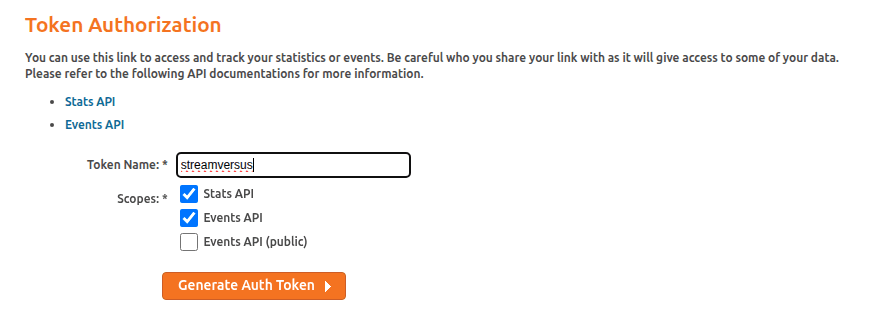
Events API URL — counts your tips
- Open chaturbate.com/statsapi/authtoken, tick Stats API and Events API, press Generate Auth Token.
- Copy the full URL, paste it into Events API URL and press Link.

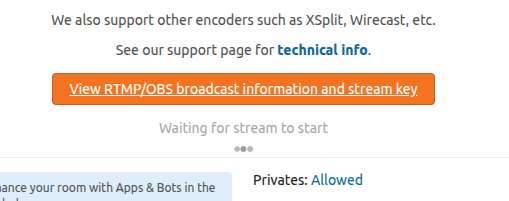
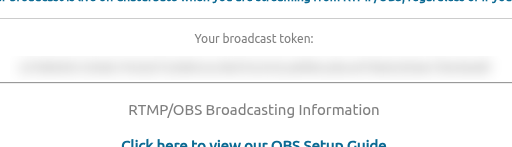
Broadcast token — lets us stream for you
- Open your Chaturbate broadcast page and press View RTMP/OBS broadcast information and stream key.
- Copy Your broadcast token, paste it into Broadcast token and press Save.
Both keys are saved once. Change them any time in your profile, card Keys.
3. Link Lovense (optional)
Viewers drive your toy with tips, live on air. You can skip this and come back later — card Lovense in your profile.
- Launch Lovense Remote on your phone or Lovense Connect on your computer and connect the toy.
- Press Link toy — a QR code appears.
- Scan the QR in Lovense Remote or enter the code in Lovense Connect — pairing finishes on its own.
- Press Test the toy — it vibrates for 3 seconds.
Keep the Lovense app open while you stream: while it is offline, viewers don’t see the toy menu.
4. Go live
- Allow the camera and microphone, then press Go live in your profile. If something is missing, a list under the button tells what — tap a line to fix it.
- On your page press Start — we stream to Chaturbate for you. No OBS needed.
5. Battle (optional)
- Press Invite and pick a model who is online. When she accepts, you appear side by side. Both of you need headphones.
- Open Games → Battle, choose Tokens (who collects more) or Orgasm (heat bars and climaxes, no winner) and press Let’s go.
Goal and games are in the Games menu — they work solo too.
Something doesn’t work?
- Tips are not counted — check the Keys card: it must say “Events are coming through”.
- Write to us: streamversuscom@gmail.com or t.me/streamversuscom